
From Microfoam to Microflow
Part one: Goodbye Isomac, welcome Gaggia!
If you had told me five years ago that I’d be working my head around water temperature, extraction pressure, and brew ratios, I would’ve laughed and reached for a cup of Nespresso coffee. But things change—especially when you discover the joy of a well-brewed espresso and the rabbit hole that comes with it.
The Espresso Rabbit Hole
Over the past few years, I’ve slowly been sucked into the world of espresso machines and the craft of brewing. It started innocently enough—just the interest in what made a good espresso. That curiosity became a hobby, and that hobby turned into a full-blown addiction for tinkering, tweaking, caffeine, and perfecting every shot. As a result, about a year ago, I bought a broken Isomac espresso machine on Marktplaats, just to see if I could bring it back to life. After plenty of troubleshooting, new parts, and way too much descaling, it worked—and the coffee was surprisingly decent.
Then it broke again.
Goodbye Isomac, hello Gaggia
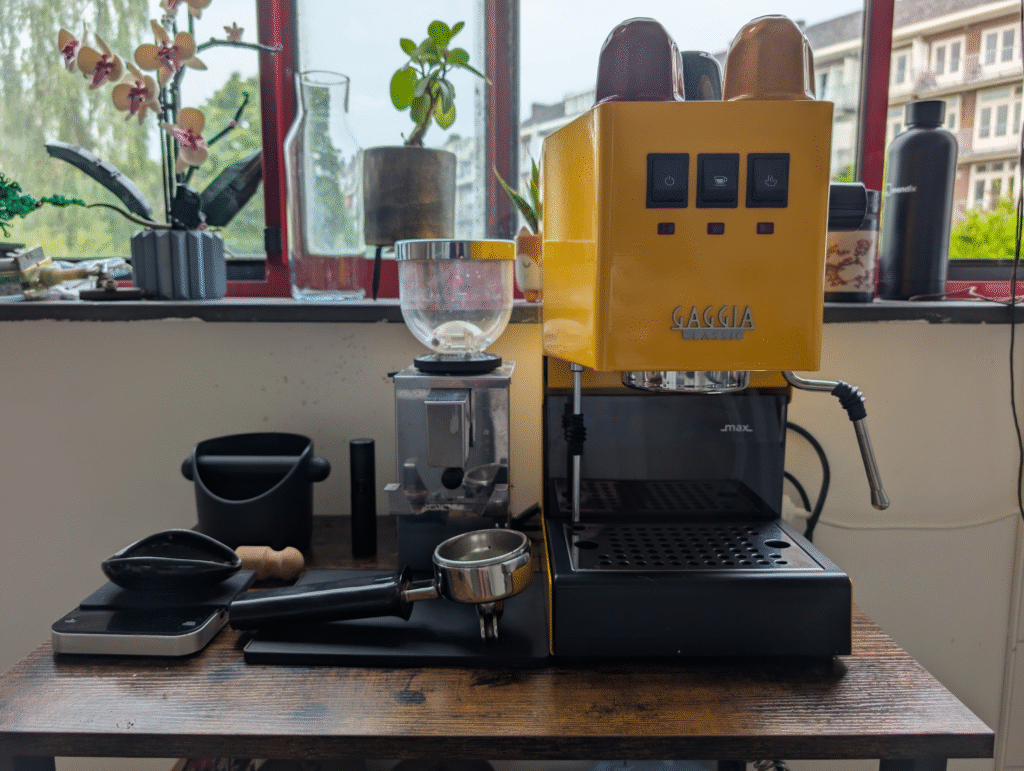
Instead of fixing it again, I decided it was time to go all in—and invest in a machine that’s built to last, built to tinker with, and built by a company that knows its espresso. I landed on the Gaggia Classic E24: a (as the name suggests) classic, semi-automatic espresso machine that’s been a favorite among home baristas since the ’90s. It’s solid, simple, and refreshingly analog—just a pump, a boiler, and a handful of switches. No screens, no presets, no complicated electronics—just the essentials done right.
What makes the Gaggia even more appealing is its thriving modding community. It’s one of those rare machines that strikes the perfect balance between capability and hackability. Whether you’re looking to install a PID controller, tweak the pressure, upgrade the steam wand, or just add some cosmetic flair, chances are someone out there has done it—and documented every step. It’s basically the espresso equivalent of a Raspberry Pi: simple enough to start with, deep enough to obsess over. Which made me think:
Why not connect it to Mendix?
From brew to cloud
One of the most exciting new mods for the Gaggia Classic is the Gaggimate—a DIY upgrade kit that adds a whole layer of digital intelligence to an otherwise analog machine. After a bit of research (and some convincing of myself), I bought the Gaggimate mod to take my setup to the next level. It includes a custom PCB that hooks into all the machine’s core functions, a 2.1-inch touchscreen for real-time control and monitoring, and all the wiring needed for installation. With it, you get full control over temperature, pressure, flow rate, shot timing, and even the ability to create and store custom brew profiles.
And the best part? It can publish live data to an MQTT broker. (If you don’t know what MQTT Means, no worries, we’ll get to that later.)
If you know me, you know I love smart solutions—especially where hardware meets software. So naturally, I want to build a Mendix app to connect to my upgraded espresso machine. The goal: create a digital logbook that tracks every shot I pull, capturing metrics like temperature, mode, and duration, while also letting me log personal notes on flavor, texture, and more. It’s part espresso obsession, part IoT experiment, and part Industry 4.0—because let’s be honest, even your coffee machine deserves a dashboard. (Sounds like HTCPCP?)
Public service announcement: This is a costly hobby
Now, a fair warning if you’re considering going down this road: this hobby will cost you. Once you’ve got the machine, it won’t be long before you’re hunting down a proper grinder, a calibrated scale, a bottomless portafilter, a precision tamper, and maybe even a puck screen or two. You’ll start off wanting better coffee—then find yourself neck-deep in stainless steel and espresso Subreddit debates. And somehow, it’ll all feel completely justified.
In this three-part blog series, I’ll take you through my journey of modifying a Gaggia Classic espresso machine, upgrading it with the Gaggimate mod, and connecting it to a Mendix application.
Logging shots with Mendix
At the heart of this project are two key components: the Gaggia Classic E24 and the Gaggimate mod. The Gaggia provides a solid mechanical foundation—just the essentials you need to pull a proper shot: a vibration pump, single boiler, group head, and physical switches for full manual control. It’s an intentionally simple machine, which makes it incredibly approachable for hardware tweaks and experimentation.
What makes the setup truly interesting from a tech perspective is the Gaggimate. It’s a custom PCB designed specifically for the Gaggia Classic, and it replaces the stock control panel with a 2.1” touchscreen interface. Under the hood, it gives you full digital control over the machine—letting you adjust brew temperature, manage preinfusion, define pressure curves, and more.
Most importantly for this project: Gaggimate speaks MQTT. MQTT (Message Queuing Telemetry Transport) is a lightweight messaging protocol that’s widely used in IoT setups. It’s designed to be fast, efficient, and perfect for sending small bits of data from devices to the cloud. In this project, the Gaggimate uses MQTT to publish real-time updates—like temperature or brewing state—to a central broker. Other systems, like my Mendix app, can then subscribe to those updates and respond as they happen. It’s like a live conversation between your coffee machine and your app—without the overhead of traditional APIs. Once connected, I can start building a digital logbook that captures every espresso shot and enriches it with both sensor data and my own tasting notes.
For local development, I could just spin up an MQTT broker on my laptop and connect the Mendix app to it. But let’s be honest: my coffee obsession doesn’t stop at my kitchen counter, and I want to access my espresso logbook from anywhere.
Thanks to my experience with Mendix and past projects involving AWS, I knew exactly where to look: AWS IoT Core.
AWS IoT Core is a fully managed MQTT broker that runs in the cloud. Using the Home Assistant MQTT plugin, I can configure the Gaggimate to publish real-time state updates to IoT Core. On the Mendix side, I’ll use the MQTT Connector from the Marketplace to subscribe to those updates and build a live, streaming experience in the app.
At the moment, Gaggimate exposes a handful of MQTT topics:
- current_temperature
- target_temperature
- mode
- brew_state
It’s not an overwhelming amount of data, but it’s more than enough to get started—and definitely more insight than I ever had with my old machine.

On the Mendix side, things get a bit more interesting. I’ll need to build logic that listens to changes in mode and brew state to detect when a shot starts and when it ends. That time window becomes the basis of a logbook entry. During that period, I’ll capture all available metrics and store them with a timestamp. Once the shot is done, I can add my own observations through the app—like taste notes, texture, cream quality, and other nuances only coffee nerds get excited about.
What’s next?
For now, everything I’ve shared is still theory—blueprints and ideas waiting to be tested. Once the Gaggimate mod kit arrives, it’s time to roll up my sleeves and get hands-on with the hardware.
That’ll be the focus of the next post in this three-part series. Less about cloud platforms and APIs, more about screwdrivers, soldering, and transforming the Gaggia Classic into a smart espresso machine. Stay tuned—things are about to get a bit more physical.

About the Author
Freek Brinkhuis is a Principal Consultant and Architect at The Orange Force, and Mendix Product MVP. He previously worked in different roles ranging from native iOS developer to Product Manager AWS at Mendix. He’s a technical all-rounder who loves to learn about new technologies and how he can implement them for his customers. In his free time, he loves to play around with both software and hardware. His growing collection of vintage Apple desktops can be seen in his online meeting background when he’s working from home!

